
A Brief Introduction to Blazor United
Blazor United revolves around unifying the Blazor technologies to simplify the development of client-side and server-side web applications. It harnesses the power of Blazor ASP.NET Core, and with the use of Razor components, provides a seamless experience for developers. Ultimately, it aims to simplify the overall web development process by offering a single, unified framework for all tasks.
Blazor United can be seen as a movement towards combining the powers of Blazor technologies within the .NET ecosystem. Let’s take a moment to understand the fundamentals of Blazor United, and how it is changing the game for web development.
- Server-side rendering with Blazor components
- Streaming rendering
- Enhanced navigation
- Client-side interactivity on a per component or a per-page level
- Ability to mix and match which render mode you want, per component, at runtime.
This will all be from within a single project. You can have islands of interactivity, based on either Blazor Server or Blazor WebAssembly, alongside server-side rendered content. You can easily switch the rendering modes and even mix them on the same page.

If you would like some assistance with .NET MAUI | Azure | Azure DevOps Services | Blazor Development then please get in touch, we would be glad to help.
A quick word on naming
As we developers know, naming is hard. This isn't a new framework. This isn't even a new hosting model for Blazor. Instead, it's actually just a collection of new Blazor features and enhancements, starting from .NET 8, that make Blazor a true full-stack WebUI framework.
To avoid confusing people into thinking that Microsoft are building something completely new and completely different, Microsoft decided to actually move away from the ‘Blazor United’ naming and instead just focus on the actual features being added to Blazor, essentially Full-stack Blazor development.
The innovative interplay between Blazor and .NET Multi-platform App UI (MAUI) under the spotlight of .NET 8 embarks on a transformative journey, reshaping the application development landscape with its blend of various hosting models and introducing the enticing concept of rendering modes. This evolution doesn’t just play a pivotal role for developers but also cascades tangible benefits to end-users and clients.
Where did we first hear about this? From the horse's mouth, so to speak
A Bifocal View on Hosting Models
Blazor’s progression from a strictly WebAssembly-based framework to embracing server-side hosting, embodied in Blazor Server, introduced a bifurcation in hosting models, each with distinctive advantages and limitations.
- Blazor Server: Boasting of a swift loading time due to its minimal initial payload and offering robust code security by retaining code on the server, it promises developers access to the full .NET runtime and direct resource connections, thereby expediting development. Yet, it is tethered by a requisite for a steady network, susceptibility to network latency, and potentially escalated cloud costs due to the server-based model.
- Blazor WebAssembly: While offering the prospects of free hosting, scalability, and network resilience, particularly through its aptitude for Progressive Web Apps (PWAs) thanks to service workers, it grapples with drawbacks like a sizeable download size, a restricted runtime, and an inherent need for enhanced code security strategies.
Full Stack Web UI with Blazor: User and Client-Focused Synergy
Through .NET 8, Blazor is no longer confined to a rigid adherence to a single hosting model. The infusion of MAUI into this equation allows developers to strategically align specific hosting models to distinct application components or pages, thereby knitting together a seamless user experience while optimizing operational efficiency.
Enhanced User Experience: By judiciously combining Blazor Server and WebAssembly, developers can fine-tune the performance and responsiveness of applications. For instance, utilizing server-side rendering for static pages to ensure rapid loading, while employing WebAssembly for dynamic, real-time functionalities like dashboards, guarantees users a snappy, seamless interface irrespective of the action or page.
Optimized Operational Costs: From a client perspective, this amalgamation implies not only a stellar application that bolsters user satisfaction and retention but also one that is cost-effective. By marrying the low operational costs of WebAssembly hosting for certain components with the performance attributes of the server-side model where necessary, clients get an application that’s financially prudent yet doesn’t compromise on performance.
Scalability and Flexibility: The introduction of rendering modes unlocks a paradigm where applications can be tailored to scale and adapt with changing user demands and client needs without necessitating monumental shifts in the development architecture. Components can be re-rendered using different models as needed, ensuring the application remains agile and adaptable to evolving requirements.
Security and Reliability: Employing Blazor Server for critical components ensures code security while using WebAssembly ensures that applications remain robust even in fluctuating network conditions. Clients are thus assured of an application that safeguards operational logic while users are presented with a consistently reliable application.
The Future Path: Render Modes
The unveiling of rendering modes in .NET 8 is poised to be a game-changer, ensuring that the synergistic application of Blazor and MAUI can be harnessed to its full potential. Developers, users, and clients stand on the precipice of an era where applications are not just user-centric and client-focused but also technically optimized, merging the realms of robust back-end development with seamless, intuitive front-end experiences.
Navigating Through Server-side Rendering in Blazor
Embracing the familiarity of traditional web applications, Server-side Rendering (SSR) resembles the operational framework of Razor Pages or MVC applications. The server orchestrates HTML generation in response to a request, enhancing initial load speeds since no client-side work or large WebAssembly assets download is needed. The server dispatches HTML, rendered by the browser, and each new page request triggers a full-page load.
Server-side Rendering: A Rethinking of Component Reusability
You may ponder, given the existence of Razor Pages and MVC, why venture into SSR with Blazor? A key motive revolves around component reusability. Unlike its predecessors, Blazor introduces a commendable component model. This mode permits the utilization of that model for creating conventionally server-rendered sites with reusable components, providing a refreshing take on structuring server-rendered applications.
Considering the positioning of Blazor by Microsoft as a preferred UI framework, there is an evident effort to streamline .NET and make it more accessible to emerging developer generations. By learning Blazor, developers are empowered to create diverse UI types, encompassing web (both static and dynamic sites), mobile, and desktop, possibly simplifying the learning curve and adoption.
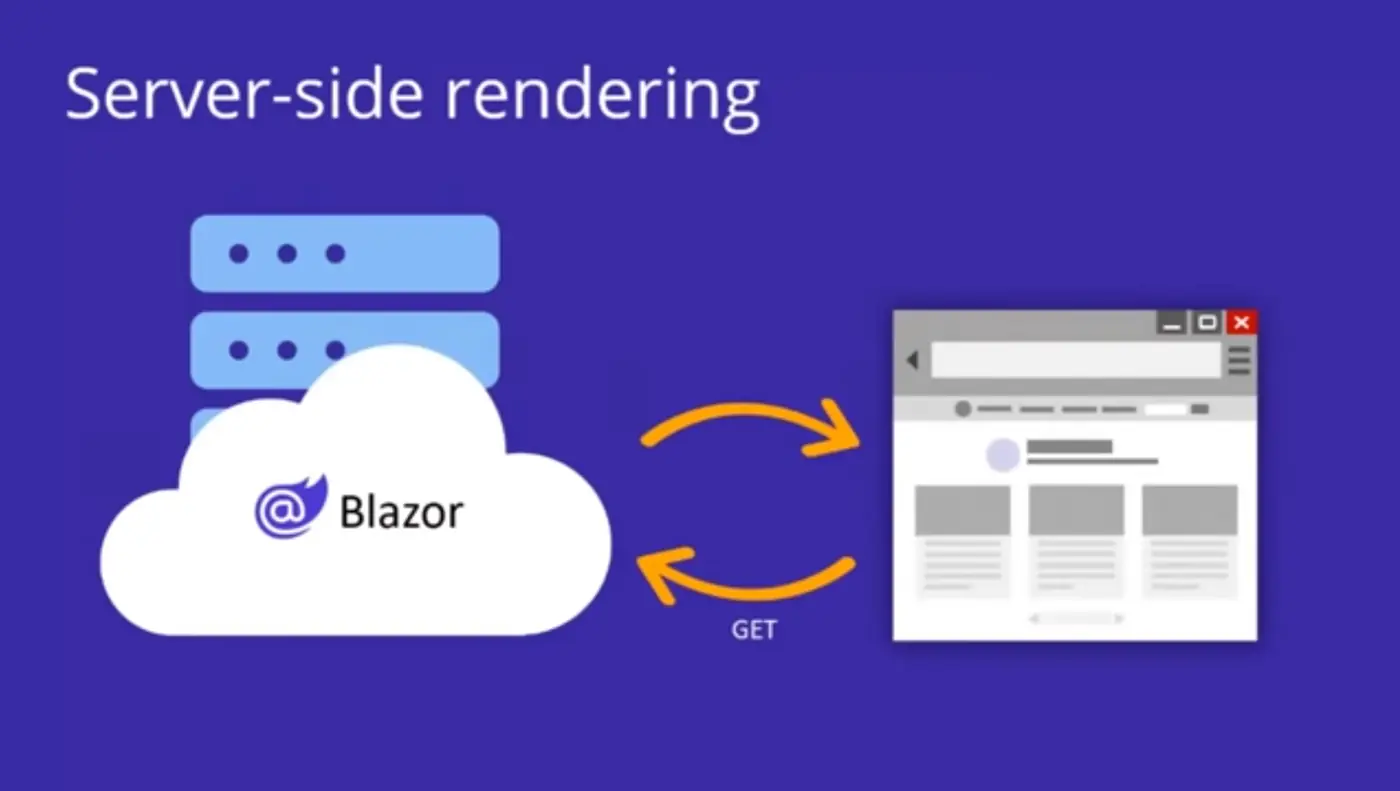
Server-side rendering
Server-side rendering means generating HTML from the server in response to a request. In the case of Blazor, what this means is that we will route requests to a Blazor component, which is acting as an endpoint. That component renders the HTML and it gets sent down in the response. Now in this model there's no WebAssembly, there's no websocket connections involved you're just getting plain HTML rendered to the browser in response to requests. This is different than Blazor server. In Blazor Server, you actually have a persistent connection and states being managed on the servers so that you get that full interactive experience. In traditional server-side rendering, the connection only lives as long as the requests and the app is typically stateless. That's what we mean when we're talking about traditional server-side rendering. We're not talking about the Blazor server model in this case.

A Glimpse into Streaming Rendering
Streaming rendering emerges as a mediator between server and client rendering, especially vital when a page in an application needs to retrieve real-time data asynchronously from databases or APIs. Unlike SSR, which would necessitate waiting for async calls to conclude before returning any HTML, streaming rendering sends initial HTML (with placeholders for asynchronous content) to be rendered by the browser while maintaining an open connection.
Once the async call is finalized, the remaining HTML is generated and transmitted to the browser via the existing connection, with Blazor on the client replacing placeholder content with new HTML, thereby enhancing user experiences by reducing apparent load times.
Streaming Rendering Example
What streaming rendering allows you to do is this: if you have pages with long-running async tasks, if you're querying the database or you're making an API call from the server and you don't want to have to wait for those tasks to complete, to get pixels down to the client, that's what streaming rendering enables you to do. You can render the page fully, with some placeholder content in any of the places where you're waiting on those long-running async tasks. Then, when each task completes, the updated content is streamed down to the client.
As an example, we could show a loading animation for a page while doing long-running tasks like initialising or fetching data from a database. Then when the database query has completed, the page can render again, with the same response stream for the original request being used, and then client-side logic helpers can apply the changes to the live DOM. You'd get pixels on the screen really fast and your app feels more responsive.
To enable streaming rendering, you add a Blazor script to your layout, provided by the framework. Once turned on, you will have enabled streaming rendering support. You don't always want streaming rendering, it can cause content to shift around. It's something you really need to design for in your app so you opt into it.
The important part to take away is that the loading animation, and then the data rendering, are all part of the one request. There are no Blazor Server circuits happening there, there's no WebAssembly involved. This is still fundamentally a stateless application doing server-side rendering. It's just you get that better and more responsive user experience. That's streaming rendering.
Server Mode: A Detailed View
This mode maintains the essence of the original Blazor Server model but introduces a feature where the optional pre-rendering of a page or component on the server is followed by enabling interactivity on the client through a SignalR connection. This mechanism ensures that events on the client are communicated back to the server via SignalR, processed there, and any required DOM updates are sent back to the client, where a modest Blazor runtime integrates the updates into the DOM.
WebAssembly Mode in Focus
Rooted in the Blazor WebAssembly hosting model, this mode maximizes client-side functionalities, allowing C# code to be executed in the user’s browser. All necessary framework DLLs and the WebAssembly runtime, along with the page, are downloaded to the client. Following bootstrapping, the page loads, API calls for data retrieval are made, and the UI is re-rendered as needed to showcase any returned data.
Auto Mode: A Balanced Approach
If there were a mode that sought to merge the benefits of Blazor Server and Blazor WebAssembly, Auto mode is the candidate. With the ability to set a page or component to utilize Auto mode, the initial component load is performed via server mode for swift loading, while concurrently, Blazor downloads necessary assets to the client to facilitate subsequent loads using WebAssembly mode.

The Role of Blazor United in Web Development
This overview peeks into the significant shift arriving with Blazor in .NET 8, dubbed Full Stack Web UI. It represents a monumental transition in the Blazor ecosystem since the introduction of hosting models, positioning Blazor as a premier UI framework for modern .NET-based web applications. New render modes empower developers with remarkable flexibility and control over how applications are rendered at each component level. However, these advancements come with their own set of challenges and responsibilities for developers to navigate.
By encouraging the use of .NET Blazor technologies across the board, Blazor United is enabling seamless integration between client-side and server-side development. This results in more maintainable codebases, improved productivity for developers, and faster web applications.
The .NET 8 release opens up the benefits of combining the server and client into a single consistent programming model based on Blazor. Modern web apps today use a variety of approaches to handle their WebUI needs. Like maybe your homepage or your blog. That's best handled with server-side rendering so that it loads fast and is easily indexed. In .NET 8 today we have support for server-side rendering with MVC and Razor pages, but for other parts of your app, maybe you need more elaborate functionality, which needs to be responsive. That part is probably best run from the client using client-side rendering. For that in .NET we of course have Blazor. But in order to use these two different approaches to WebUI together in a .NET App, you currently have to mix different frameworks. This means being able to use these two things together. Microsoft is combining the strengths of the server and client into a single consistent programming model based on Blazor, so that you can build full-stack WebUI using Blazor components.
Blazor United in 2026: what actually shipped
Updated August 2026. Everything described above did ship — just not under the ‘Blazor United’ name. With the release of .NET 8 in November 2023, Blazor became a unified, full-stack web UI framework: static server-side rendering by default, streaming rendering, enhanced navigation and form handling, and the ability to make individual components or pages interactive using the Server, WebAssembly or Auto render modes. The codename quietly disappeared; today Microsoft and the community simply call it Blazor.
The model has matured steadily through .NET 9 and .NET 10, with refinements to reconnection, prerendering and the developer experience rather than any further conceptual upheaval. The render-mode decisions this article anticipated are now everyday choices: render statically wherever you can, and opt into interactivity only where a page or component genuinely needs it.
- Static SSR is the default — fast, stateless and ideal for content-heavy pages.
- Interactive Server gives instant interactivity over a SignalR connection with a tiny payload.
- Interactive WebAssembly runs your components in the browser once the runtime has downloaded.
- Interactive Auto starts on the server for a fast first load, then switches to WebAssembly on subsequent visits.
As of 2026, our recommendation for new work is straightforward: build on .NET 10 (the current LTS), start with static rendering, and add interactive render modes per component as requirements demand. If you are weighing up these choices for your own application, our Blazor development team works with this model daily — see also our full-stack Blazor development page, or get in touch for an informal chat.
The Assemblysoft advantage for Blazor United Development
At Assemblysoft we have invested heavily in specialising in Blazor Server, Blazor WebAssembly, .NET MAUI Blazor Hybrid and now Fullstack Blazor UI (AKA Blazor United). As Fullstack Blazor development is a relatively new offering in terms of maturity, there remain a number of challenges that are not readily solved by existing libraries and documentation. As our development team at Assemblysoft have already completed a number of applications that are in production, we have already encountered and solved these challenges, saving you time and money as we leverage our deep experience.

At Assemblysoft we specialise in Custom Software Development tailored to your requirements. We can onboard and add value to your business rapidly. We are an experienced Full-stack development team able to provide specific technical expertise or manage your project requirements end to end. We specialise in the Microsoft cloud and .NET Solutions and Services. Our developers are Microsoft Certified. We have real-world experience developing .NET applications and Azure Services for a large array of business domains. If you would like some assistance with Azure | Azure DevOps Services | Blazor Development | .NET MAUI Development or in need of custom software development, from an experienced development team in the United Kingdom, then please get in touch, we would love to add immediate value to your business.

Assemblysoft - Your Safe Pair of Hands