

Xamarin.Forms has been with us nearly seven years! It has played a crucial role in cross-platform application development and has helped countless developers succeed year after year. But now it’s time to say goodbye to Xamarin.Forms and happily welcome .NET MAUI (Multi-platform App UI). .NET MAUI is going to help us be even more successful in app development.
Note: If this is your first time hearing about .NET MAUI, please read this MAUI introduction blog to get acquainted.
You may have this million-dollar question in your mind: why use .NET MAUI when we have Xamarin?
.NET MAUI is the evolution of Xamarin.Forms. It is extended from mobile to desktop scenarios with UI controls rebuilt from the ground up for performance and extensibility.
In this blog post, we will discuss the top five advantages of .NET MAUI over Xamarin.Forms:
- Single development project experience with .NET CLI
- Slim renderers
- Modern patterns
- Complete support for hot reloads
- Unification of libraries

1. Single development project experience with .NET CLI
With Xamarin.Forms, developers may become frustrated while working with multiple projects targeting multiple platforms; keeping images, fonts, and platform-related code organized; and adding different dependencies, and resolving them if they’re referenced as NuGet packages. Encountering these problems, developers may think, “Why don’t we have an option to do this stuff in a single project?”
.NET MAUI comes with a single project to solve all these issues. Still, you will need to do some platform-specific operations because we can’t just get rid of that stuff.
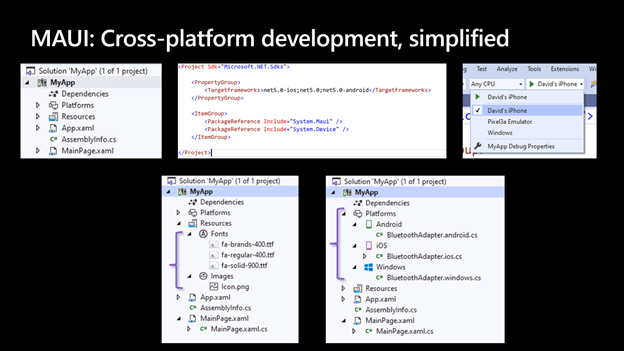
.NET MAUI also provides support for .NET CLI tool-chain to build, develop, run, and publish .NET applications seamlessly.
2. Slim renderers
Xamarin.Forms uses and depends on custom renderers that are not used in .NET MAUI. Knowing this, you may ask, “What will happen with the custom renderers used in my current application?” Don’t worry. Custom renderers can still work using a compatibility package, but it is recommended to migrate and use the new slim renderer pattern. Doing so will help make your app lightweight and the developing experience easier. .NET MAUI is loosely coupled, and there are no Xamarin.Forms dependencies in it.
Note: Refer to the slim renderers demo to learn more about it.
3. Modern Patterns
As you know Xamarin.Forms support MVVM (model-view-viewmodel) and RxUI (ReactiveUI) patterns. In addition to those, .NET MAUI will support MVU (model-view-update) and Blazor development patterns.
Every property of the Syncfusion .NET MAUI controls is completely documented to make it easy to get started.
MVU
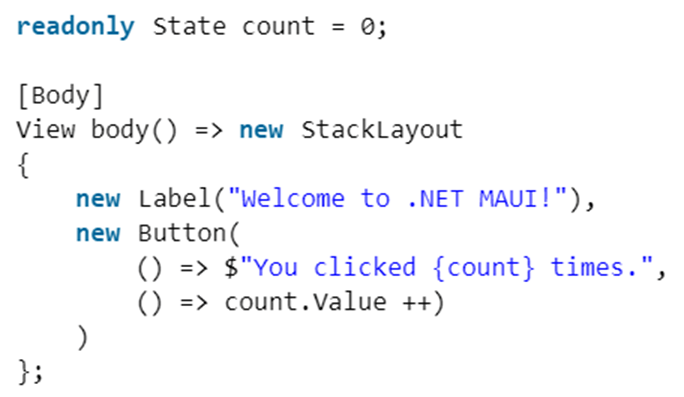
This pattern provides a unified way to build cross-platform native front ends from a single code base. It also allows us to write UI code and logic in C# as shown below.
Blazor
As we know, Blazor is one of the most adaptive programming models for building web applications. .NET 6 will extend Blazor’s target scenarios (not in Preview 1, but maybe before GA) to include native desktop applications that may rely on web-based rendering. Blazor desktop will be structured similar to the way Electron works.
4. Complete support for hot reloads
Complete hot reload support will be provided for .NET MAUI. The comparison is summarised below:
- Xamarin.Forms — XAML hot reload: experimental in SDK 4.x with Visual Studio 2019 prior to version 16.9; feature complete in SDK 5.x with Visual Studio 2019 version 16.9 or newer.
- Xamarin.Forms — .NET hot reload: not available on iOS/Android; limited support on UWP for runtime edits using .NET’s Edit and Continue feature.
- .NET MAUI: complete support for both XAML and .NET hot reload.

If you would like some assistance with .NET MAUI | Azure | Azure DevOps Services | Blazor Development then please get in touch, we would be glad to help.
5. Unification of libraries
.NET MAUI comes with the unification of critical libraries. It provides several benefits by merging the Xamarin.Essentials library into .NET MAUI so that you can easily use device capabilities like device sensors, photos, contacts, and many services you use on a regular basis like authentication and secure storage.
Conclusion
Thanks for reading! We hope you are intrigued by the top five advantages of .NET MAUI over Xamarin.Forms explained in this blog post.
2026 update: the question is settled
Updated August 2026. When we published this article in 2022, .NET MAUI versus Xamarin was still a live debate. It no longer is. Xamarin reached end of support on 1 May 2024, which means no security fixes, no updates for new iOS and Android releases, and growing friction with app store requirements. .NET MAUI is the successor and is current in .NET 10, with each release since 2022 improving stability, performance and tooling.
If you are still running a Xamarin or Xamarin.Forms application in production, the advantages listed above are no longer the reason to move — the fact that your platform has been unsupported for over two years is. Every month of delay adds risk and makes the eventual migration harder, as dependencies and platform SDKs drift further from what Xamarin can consume. Our advice is to put a migration plan in place now: audit your custom renderers and third-party packages, decide between .NET MAUI XAML and .NET MAUI Blazor Hybrid, and target .NET 10 so the resulting app sits on a long-term support release.
We have helped teams make exactly this move as part of our custom software development work, and we are happy to review an existing Xamarin codebase and give you an honest view of the effort involved.
At Assemblysoft we specialise in Custom Software Development tailored to your requirements. We can onboard and add value to your business rapidly. We are an experienced Full-stack development team able to provide specific technical expertise or manage your project requirements end to end. We specialise in the Microsoft cloud and .NET Solutions and Services. Our developers are Microsoft Certified. We have real-world experience developing .NET applications and Azure Services for a large array of business domains. If you would like some assistance with Azure | Azure DevOps Services | Blazor Development | .NET MAUI Development or in need of custom software development, from an experienced development team in the United Kingdom, then please get in touch, we would love to add immediate value to your business.

Assemblysoft - Your Safe Pair of Hands